TP-Link Tapo C220 Camera Review 2026 – 4MP AI Wi-Fi Security Camera
2K QHD Video • AI Detection • Motion Tracking • Night Vision
Looking for an indoor security camera that can monitor your home, keep an eye on pets and send activity alerts to your phone? The TP-Link Tapo C220 Pan/Tilt AI Home Security Wi-Fi Camera is a feature-rich option worth exploring.
This camera combines 4MP QHD video recording with a motorised pan-and-tilt mechanism, smart detection features, infrared night vision and two-way audio. It also supports local recording on a compatible microSD card, which can be useful for people who prefer to store footage at home.
In this detailed review, we cover the Tapo C220's specifications, important features, potential advantages, limitations, storage options and buying considerations. The aim is to help you decide whether this indoor camera suits your home-security needs.
TP-Link Tapo C220 4MP Security Camera
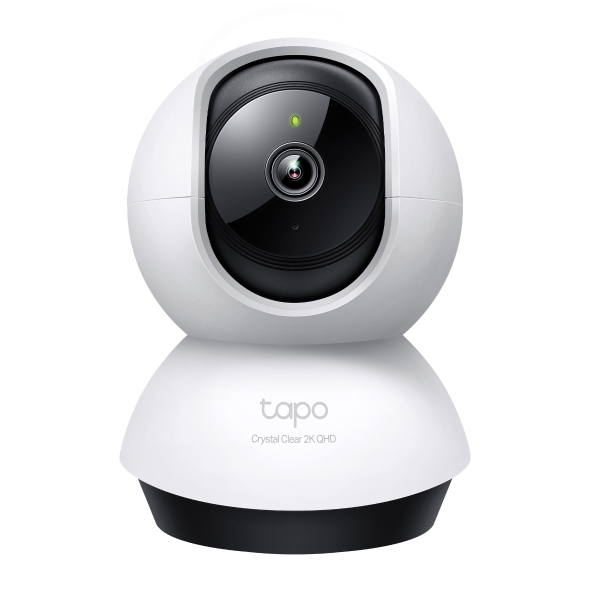
Image source: TP-Link official website. Blogger image display has not been independently tested.
Check Price on Amazon →Check the latest price, seller, warranty and availability on Amazon.
1. TP-Link Tapo C220 Specifications
| Specification | Details |
|---|---|
| Product model | TP-Link Tapo C220 |
| Video resolution | 4MP 2K QHD, 2560 × 1440 pixels |
| Horizontal coverage | 360° pan coverage |
| Vertical coverage | Approximately 110°–114°, depending on specification/version |
| Night vision | Infrared night vision, advertised up to 30 feet on the India product page |
| AI detection | Person, pet and other supported event detection |
| Audio | Built-in microphone and speaker |
| Connectivity | 2.4GHz Wi-Fi |
| Local storage | microSD card up to 512GB |
| Cloud storage | Tapo Care subscription service, where available |
| Outdoor protection | Indoor camera; not weatherproof |
Specifications are based on the manufacturer's published information. Feature availability may vary by hardware version, region and app version.
2. 4MP QHD Video: More Detail in Your Room
One of the Tapo C220's main attractions is its 2560 × 1440-pixel 4MP QHD resolution. It captures more pixels than a standard 1080p Full HD camera, potentially making it easier to inspect details in a room.
Higher resolution can be helpful when reviewing recorded footage or checking live video on your phone. However, image quality also depends on lighting, camera placement, network conditions and the distance between the camera and the subject.
- Useful for everyday indoor monitoring.
- Can provide more detail than a standard 1080p image.
- Suitable for checking activity in a living room, bedroom or study.
- Digital zoom does not guarantee clear details at long distances.
3. 360° Pan-and-Tilt Coverage
A fixed security camera can only monitor the direction in which it is installed. The Tapo C220 uses a motorised pan-and-tilt design, allowing you to change its viewing direction through the compatible app.
The manufacturer advertises 360° horizontal coverage and approximately 110°–114° of vertical coverage, depending on the specification shown for the version. This makes the camera useful for checking different parts of a room without manually repositioning it.
- Change the camera's direction remotely.
- Monitor a wider indoor area from one installation point.
- Check different corners of a room when needed.
- Remember that walls, doors, furniture and other obstructions still block the view.
4. AI Detection and Smart Notifications
The Tapo C220 supports smart detection features designed to help distinguish relevant activity. Depending on the supported feature and app configuration, the camera can identify people and pets and provide notifications for other supported events.
These alerts can be more useful than receiving a notification every time something moves in the room. You can also configure activity zones on supported versions to focus on the areas that matter most.
| Feature | Why it matters |
|---|---|
| Person detection | Helps identify human activity. |
| Pet detection | Useful for checking pets indoors. |
| Motion detection | Alerts you when movement is detected. |
| Activity zones | Can help focus alerts on selected areas. |
| Sound-related detection | Some supported sound events may trigger notifications. |
Detection is not perfect and may produce missed events or false alerts. Test the settings after installation and do not rely on a consumer Wi-Fi camera as your only emergency or alarm system.
5. Smart Motion Tracking
Motion tracking is another useful feature. When the camera detects movement, it can follow the moving subject by adjusting its direction, helping keep activity within the camera's view.
This may be helpful when monitoring pets moving around a room or checking activity in a larger indoor space. Tracking performance depends on the subject, lighting, obstructions and detection settings.
Keep in mind that motion tracking does not mean the camera can see through objects or monitor areas outside its physical field of view.
6. Infrared Night Vision
Night vision allows the Tapo C220 to continue monitoring when the room becomes dark. Its infrared system is designed for low-light and dark indoor environments.
- Useful for monitoring rooms at night.
- Can help you review activity when the lights are off.
- Infrared footage is generally monochrome, not natural colour.
- Actual visibility depends on the room layout and environmental conditions.
The India product page specifies night vision up to 30 feet. Treat this as a manufacturer-stated figure rather than a guarantee that every object will be clearly identifiable at that distance.
7. Two-Way Audio: Listen and Talk
The camera has a built-in microphone and speaker that support two-way audio. Using the compatible app, you can listen to sounds near the camera and speak through your phone.
Possible everyday uses include:
- Talking to family members in another room.
- Checking on pets while away from home.
- Communicating with someone near the camera.
- Listening for activity in the monitored area.
Audio clarity may vary with background noise, internet quality and the distance between the speaker and microphone.
8. Local microSD Storage up to 512GB
The Tapo C220 supports a compatible microSD card with a capacity of up to 512GB. Local storage can be useful if you want to keep recorded footage on a card inserted into the camera.
The memory card is purchased separately. If you prefer cloud recording, Tapo Care subscription services may be available depending on your region and plan.
| Storage option | What to know |
|---|---|
| microSD card | Local storage; card sold separately. |
| Cloud service | Subscription may be required; availability varies. |
| Playback | Depends on recording settings and the selected storage method. |
Before buying a memory card, check the camera's compatibility requirements. Recording duration depends on card capacity, recording settings and the amount of activity captured.
9. Privacy Features and Account Security
A home camera should be convenient without compromising privacy. The Tapo C220 offers privacy controls, including configurable privacy zones, to help block selected areas from being monitored.
- Use a strong, unique password for your account.
- Keep the camera firmware and app updated.
- Place the camera carefully to avoid unnecessary recording of private areas.
- Review sharing permissions and account security settings.
- Use privacy controls when you do not want selected areas monitored.
Privacy settings should be checked after installation to make sure they match your needs.
10. Pros and Cons
✓ Advantages
- 4MP QHD video resolution
- 360° horizontal coverage
- Smart person and pet detection
- Motion tracking support
- Infrared night vision
- Two-way audio
- Local microSD storage up to 512GB
- Customisable activity and privacy zones
✗ Limitations
- Designed for indoor use
- Requires a power connection
- Uses 2.4GHz Wi-Fi
- Memory card is sold separately
- Cloud storage may cost extra
- AI alerts are not always perfect
- Performance depends on network and placement
11. Who Should Buy the Tapo C220?
| Requirement | Suitability |
|---|---|
| Indoor home monitoring | Worth considering |
| Pet monitoring | Useful features for indoor use |
| Monitoring a living room | Pan-and-tilt coverage may help |
| Outdoor gate exposed to rain | Choose a weatherproof outdoor camera |
| Location without Wi-Fi | Not suitable without a compatible network |
12. Things to Check Before Ordering
- Confirm the model: Check that the listing says Tapo C220, not C210 or another camera.
- Check Wi-Fi: A suitable 2.4GHz Wi-Fi network is required.
- Check storage: A microSD card is sold separately.
- Review the warranty: Read the warranty and return policy on the listing.
- Compare the price: Check the current price and seller details before ordering.
- Confirm included accessories: Check the product package description.
Check TP-Link Tapo C220 on Amazon
See the current listing, seller information, warranty and availability before making your decision.
View on Amazon →As an Amazon Associate, this website may earn from qualifying purchases.
13. Frequently Asked Questions (FAQs)
Q1. Is the TP-Link Tapo C220 a 4MP camera?
Yes. It supports 4MP QHD video at 2560 × 1440 pixels.
Q2. Does the Tapo C220 support 360° viewing?
It offers 360° horizontal pan coverage and a limited vertical tilt range.
Q3. Can it follow movement automatically?
Yes, it supports smart motion tracking. Results depend on detection, lighting and the environment.
Q4. Does it support night vision?
Yes. It uses infrared night vision for monitoring in low-light or dark indoor conditions.
Q5. What is the maximum microSD card capacity?
The manufacturer lists support for microSD cards up to 512GB. The card must be purchased separately.
Q6. Is a cloud subscription compulsory?
Cloud storage uses a subscription service where available. The camera also supports local microSD storage.
Q7. Can I install the Tapo C220 outdoors?
It is an indoor camera without a weather-resistance rating. Do not expose it to rain or outdoor weather.
Final Verdict: Is the Tapo C220 Worth Considering?
The TP-Link Tapo C220 brings together 4MP QHD video, pan-and-tilt coverage, AI detection, motion tracking, night vision and two-way audio in one indoor security camera.
It may suit households that want to monitor rooms or pets and receive activity alerts on a phone. Local microSD storage is another useful option for buyers who want to keep footage at home. However, it needs power and Wi-Fi, and it is not designed for exposed outdoor installation.
Before purchasing, compare the current price and warranty, confirm the exact model and check which features are available for your hardware version and region.
Disclosure: This article is for informational purposes. Product specifications are based on manufacturer information and may vary by version or region. The Amazon link is an affiliate link. The product image URL is hosted by TP-Link; its display in Blogger has not been independently tested.